Rackscope

Physical infrastructure visibility for data centers and HPC clusters

When an alert fires — know exactly where it is.

An interactive, real-time view of your entire physical infrastructure — every level, instantly accessible.

Toulouse HPC
Machine Room A
Compute Aisle
Rack C04
compute-042
https://rackscope.dev/home
1 / 6
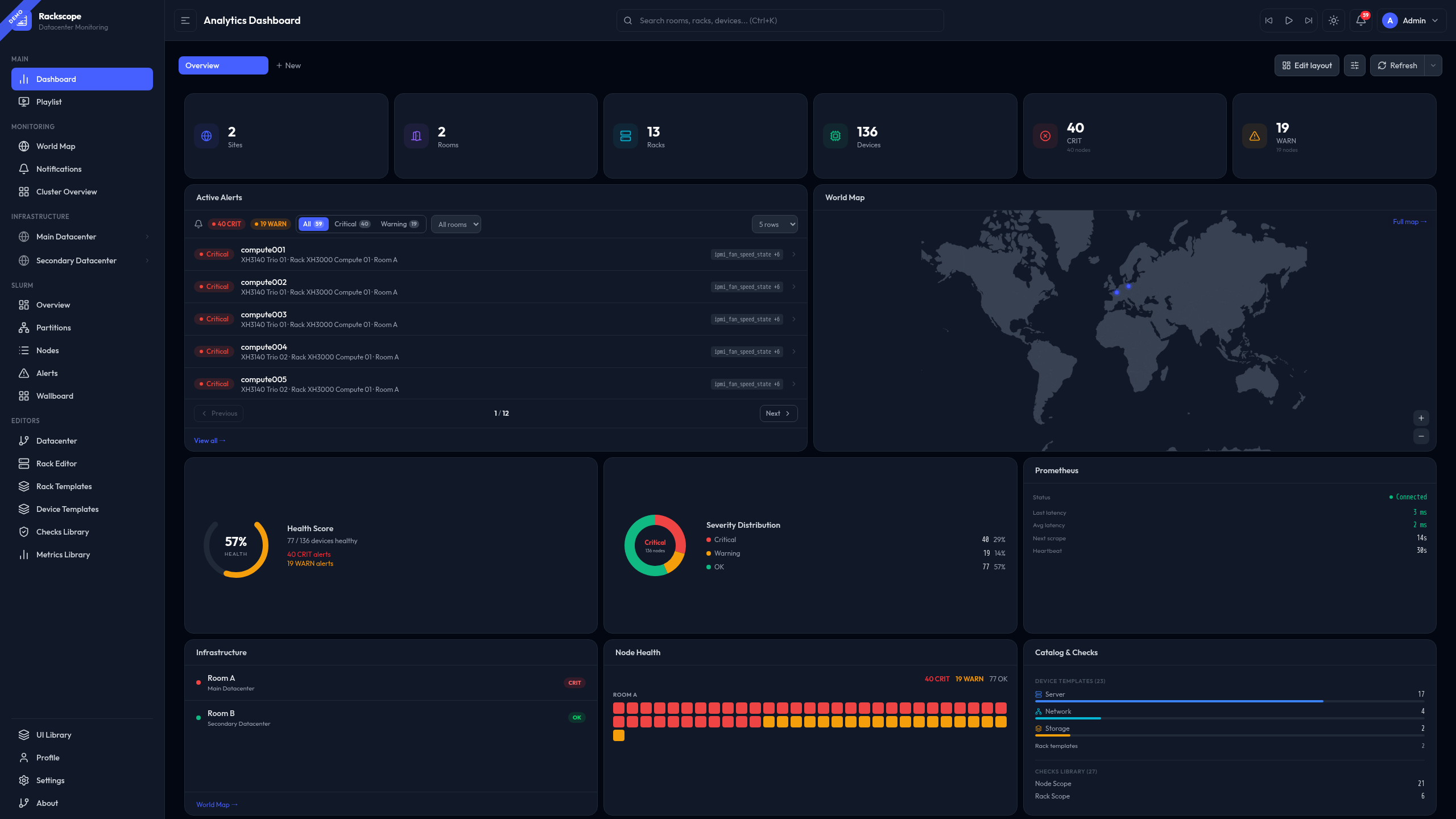
Rackscope — Analytics Dashboard
Analytics Dashboard
Drag-and-drop widget grid with live health, alerts, world map and Prometheus stats
Design Philosophy

See your infrastructure,
not your spreadsheets.

Three principles that are non-negotiable.

📄

Zero Database

All configuration is stored in YAML files — GitOps-compatible, version-controlled, and diff-friendly. Commit your infrastructure topology to Git and roll back with a single command.

📡

Prometheus-Only

Every health state derives from a live PromQL query against your existing Prometheus instance. No agents, no collectors, no additional telemetry infrastructure to operate.

🏗️

Physical Hierarchy

Site → Room → Aisle → Rack → Device → Instance. Health states propagate upward — a failing node elevates its rack to CRIT, which propagates to the room level.

Physical drill-down

Zoom in. All the way.

Every alert is anchored to a precise physical location. Navigate progressively from a global overview to the exact device — at each level, only the relevant information is displayed.

🌍
GlobalAll sites — health summary, world map, active alerts
start here
🏢
DatacenterSite-level overview — rooms, live status, drill-down
🗺️
RoomFloor plan — aisle layout, rack grid, health heatmap
🔲
AisleRow of racks — aisle state, cooling zones
🖥️
RackFront/rear elevation — device placement, U occupancy
DeviceChassis or unit — instances, checks, live metrics
🔬
InstanceSingle node — health state, check results
Universal by design

Any metric. Any team.

Any metric exposed in Prometheus can become a visible health check in Rackscope — whether it originates from hardware, software, network infrastructure, or HPC workloads.

🔩
Hardware teams
Physical infrastructure
Server / rack health
Temperature & cooling
PDU load & power
Network infrastructure
Storage health
Cooling sensors
Prom
QL
💻
Software teams
Services & applications
Service availability
Application error rates
HPC workload states
Job queue depth
Any custom exporter
Plugin system
CMDB-agnostic. Generate your YAML topology from NetBox, RacksDB, any script, or use the API directly. No vendor lock-in — if your tools can write a file, Rackscope can read it.
Positioning

The physical layer that was missing.

Rackscope does not replace existing tools. It fills the gap between metrics dashboards and supervision platforms — adding the physical location of every alert to the monitoring chain.

📊
Grafana
Metrics & dashboards. Charts, panels, time series. Indicates what is happening.
"cpu_usage is 95%"
RACKSCOPE
🔭
Physical context
Bridges metrics to physical location. Answers where — which rack, which aisle, which room.
"Rack C04, Aisle 2, Machine Room A"
🚨
Supervision
Full monitoring & alerting. Nagios, Zabbix, PagerDuty. Determines what action to take.
"Ticket #4821 opened"

Not a replacement. The intermediate layer that was missing between your metrics dashboards and your supervision platform.

How it works

From Prometheus to physical view

Four steps — from your existing infrastructure to a live physical view. No agent to deploy, no database to provision.

01
📄

Define your topology

Write YAML files describing your physical infrastructure — sites, rooms, aisles, racks, devices. Or generate them from NetBox, RacksDB, any script, or the API.

topology.yaml
02
📡

Connect Prometheus

One URL. Point Rackscope at your existing Prometheus instance. No collector to deploy, no agent to install, nothing to change in your stack.

prometheus_url:
03
🔗

Map your checks

Any metric with the right labels becomes a visible health check. IPMI temperature, PDU load, software service status, Slurm node state — anything Prometheus scrapes.

expr: up{...}
04
🔭

See your infrastructure

Launch and navigate from global to instance level. When something is CRIT, you know exactly which rack, which aisle, which room — not just a hostname in an alert.

make up

The documentation covers everything in detail. Start where it makes sense for you.

Rackscope · AGPL-3.0Not another Grafana plugin.